Convert JPG to PDF
Combine JPEG photos, camera snapshots, or scanned receipts into a clean PDF document with custom margins and sizing.
Select JPG images to convert
JPG or JPEG photos — each becomes one page
Processed locally in your browser. Never uploaded.
Transform Photos, Scanned Invoices, and Camera Snaps into Print-Ready PDFs
Client-side JPEG container encapsulation with zero compression loss
JPEG is the world's most ubiquitous format for digital photography, mobile document scanning, and invoice capture. However, government portals, email clients, legal filing systems, and universities almost universally require submission in PDF format.
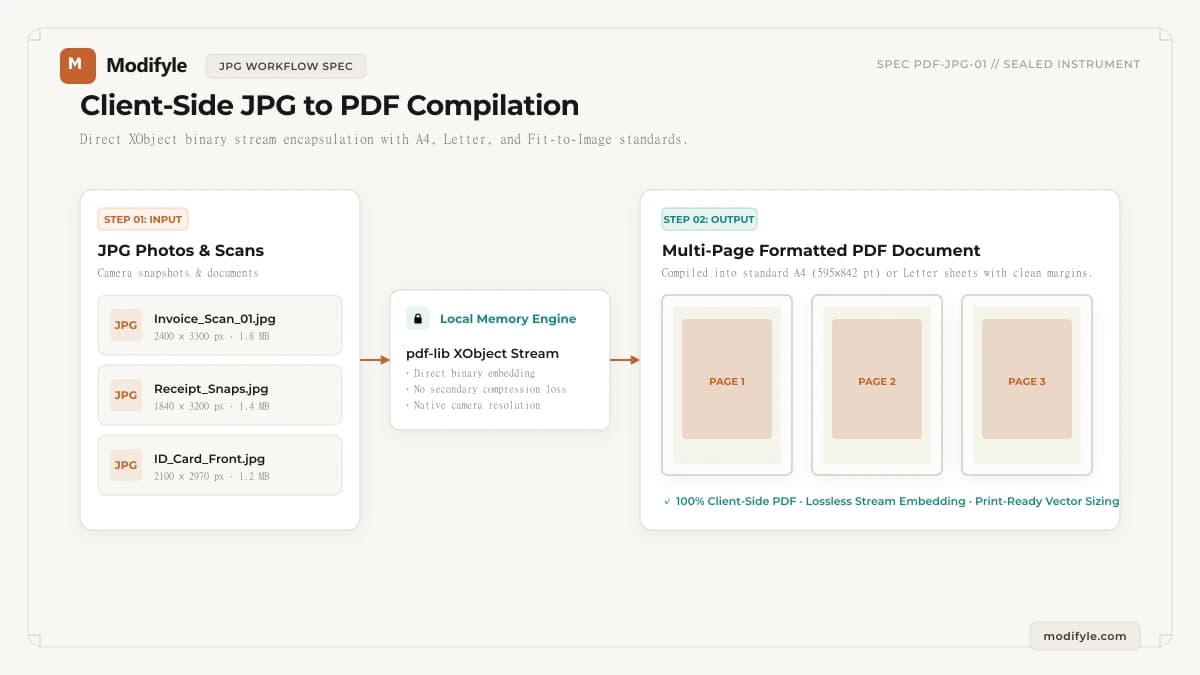
Modifyle embeds your JPG streams into an ISO-standard PDF document right inside your browser. By embedding native JPEG binary streams directly into PDF XObject image dictionaries, the original resolution, color space, and metadata are maintained without secondary lossy re-encoding.
Choose between Fit-to-Image for exact pixel-for-pixel dimensions, or standardize your document for physical printing by formatting onto standard A4 or US Letter sheets with clean margins.
What Can You Use This Tool For?
Real-world problems solved and intended workflows for this tool.
Confidential Legal & Financial Document Workflow
Process agreements, tax filings, and statements with Convert JPG to PDF directly in device memory without external server risk.
Official Government & University Document Submission
Prepare application packets using Convert JPG to PDF to satisfy strict institutional upload criteria.
Multi-Document Assembly & Archival Preparation
Organize client deliverables, audits, and reports with clean page indexing and layout consistency.
Optimized Distribution for Mobile & Email
Format documents with Convert JPG to PDF so attachments send quickly and open smoothly on all screen sizes.
How It Works in 3 Simple Steps
Upload JPG Images
Select one or more JPEG or JPG photos from your phone, camera, or desktop folder.
Choose Layout & Paper Sizing
Select Fit to Image (native proportions), A4 (international), or US Letter (North American standard).
Export & Download PDF
Click Convert to compile the document instantly in browser memory and download your PDF.
- Processing executes locally in browser memory. Large files depend on available device RAM and CPU capacity.
Why choose Modifyle JPG to PDF Converter?
Launch PDF, image, and QR tools in 1 click right from your home screen or desktop dock. 100% private, client-side, with full offline capability without internet.